
TUI Reference
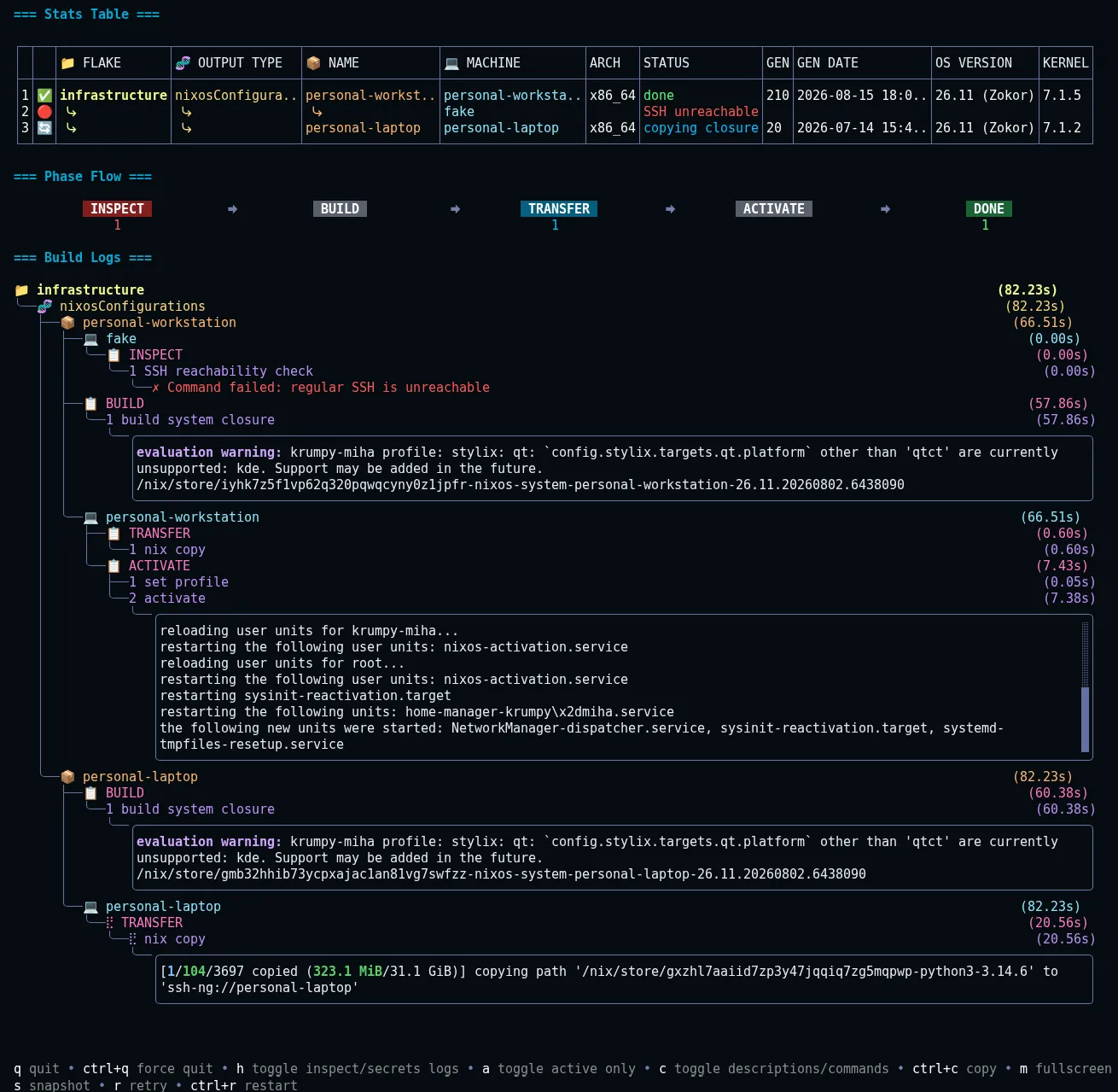
The TUI stacks three views in one scrolling column: a live stats table (one row per machine), phase status, and build logs. Each stats row shows the machine, its status, flake, installable (output type and attribute name), architecture, generation and its date, OS version, and kernel version. Click or navigate (left/right) to a machine to filter its build logs; this also works for phase status.
Keybinds
Section titled “Keybinds”| Key | Action |
|---|---|
r | Retry failed phases (unavailable with --require-all-success) |
ctrl+r | Restart entire workflow (does not reread the yaml config; unavailable with --require-all-success) |
m | Toggle logs fullscreen |
esc | Exit fullscreen, or deselect the selected build log viewport |
ctrl+c | Copy active build logs label or command output to clipboard |
c | Toggle labels between descriptions and raw commands |
h | Toggle to include inspect and secrets phases in the build logs |
a | Show only active/errored build logs |
left/right | Navigate between stats table or phase status entries |
mouse click | Select an entry from stats table, phase status, build logs (selecting selected stats table or phase status deselects them) |
mouse scroll/up/down/j/k/pgup/pgdown | Scroll main view or inner view when selected |
s | Take a snapshot of current workflow state (not available in snapshot view; see Snapshots) |
ctrl+t | Open the theme picker: browse with up/down (live preview), enter apply, esc cancel, q/ctrl+q quit; the footer shows the picker keybinds while it is open (see Themes) |
q | Quit (sends stop signal to commands and waits for them to finish, then exits) |
ctrl+q | Force quit immediately |
Large Fleets
Section titled “Large Fleets”When deploying to many machines, maximize visibility:
- Show only active/errored build logs:
akeybind or--tui.show-active-onlyflag - Reduce build log viewport height:
--tui.command-output-max-height=N(default: 8) - Cap concurrent workers with
--runtime.max-concurrency(default0= unlimited), see CLI Deploy
panix deploy --tui.show-active-only --tui.command-output-max-height=2Both flags can also be set in the config under flags.tui (show_active_only, command_output_max_height).
The most useful keybinds for debugging are a (show active only), h (show all build logs), and c (toggle command labels).